An editor that turns ABC notation into a score and plays it in the browser
María Teresa González created a simple music editor: you type the melody as text, the score appears and you can listen to it, with nothing to install.
“Editor Musical Interactivo con Audio” is a web page by María Teresa González, shared under a Creative Commons BY-SA (Attribution-ShareAlike) licence, according to the repository entry. Its author presented it in the Vibe Coding Educativo group in June 2025, published on GitHub and Netlify. According to the entry, it is intended for primary and secondary education, in the area of Arts and Humanities, and it is in Spanish.
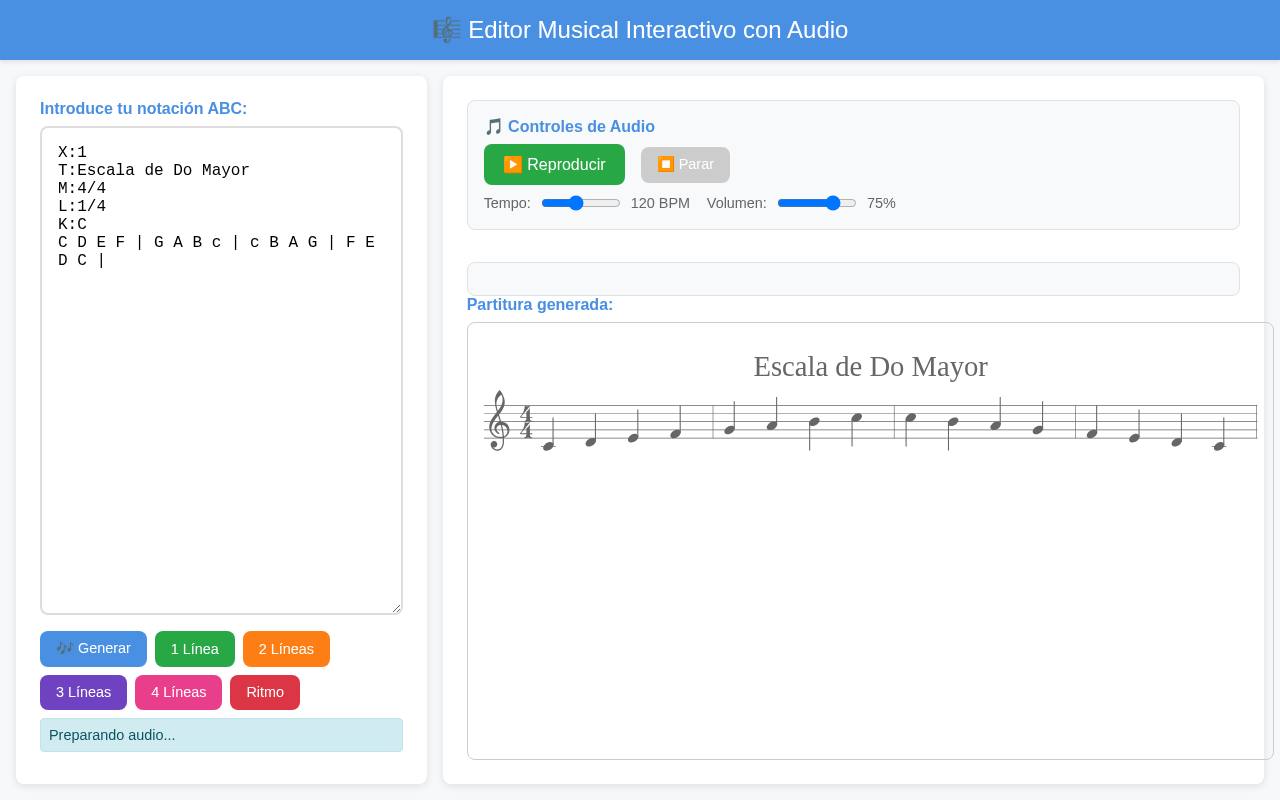
When you open it, there is a text box on the left where the music is written in ABC notation, a text format that describes a melody with letters and bar lines. The page comes with an example already written, a C major scale with its title, time signature and key. On the right, under “Partitura generada” (generated score), the stave is drawn with the treble clef, the 4/4 time signature and the notes.
Above the score there are two audio controls, “Reproducir” (play) and “Parar” (stop), with a tempo slider (120 beats per minute when it opens) and a volume slider (75%). Below the text box there are buttons to generate the score and, in addition, others labelled “1 Línea”, “2 Líneas”, “3 Líneas”, “4 Líneas” and “Ritmo”. The screenshot does not show exactly what each of these last ones does, so it is worth trying them out before planning a lesson.
For a music teacher, the most valuable thing is that students can write, listen to, correct and listen again to their own melody without needing instruments or a complex editing program. According to the entry, which reports what its author says, it can be used with the interactive whiteboard for melodic dictation, collective composition, correcting scores that contain errors or transcribing rhythmic fragments.
The drawback is that it requires learning ABC notation, which in secondary education can be one more item of classroom content, but in primary education will need teachers to give guidance or prepare starting melodies. It is used directly in the browser, with no visible account on the page. A modest resource, but a useful one for bringing the stave and sound to any classroom with a computer.