Transcribe audio and video and create subtitles without the file leaving your computer
Transcribe turns recordings into text and subtitles with the Whisper model, inside the browser and without sending anything to third parties. It was created by Juan José de Haro.
Transcribe is a web app that turns an audio or video file into text and lets you download the result as plain text or as subtitles. It was created by Juan José de Haro and opens in the browser, with nothing to install. The page says no data is sent to third parties: everything happens in the browser itself, which matters with recordings of lessons or students' voices.
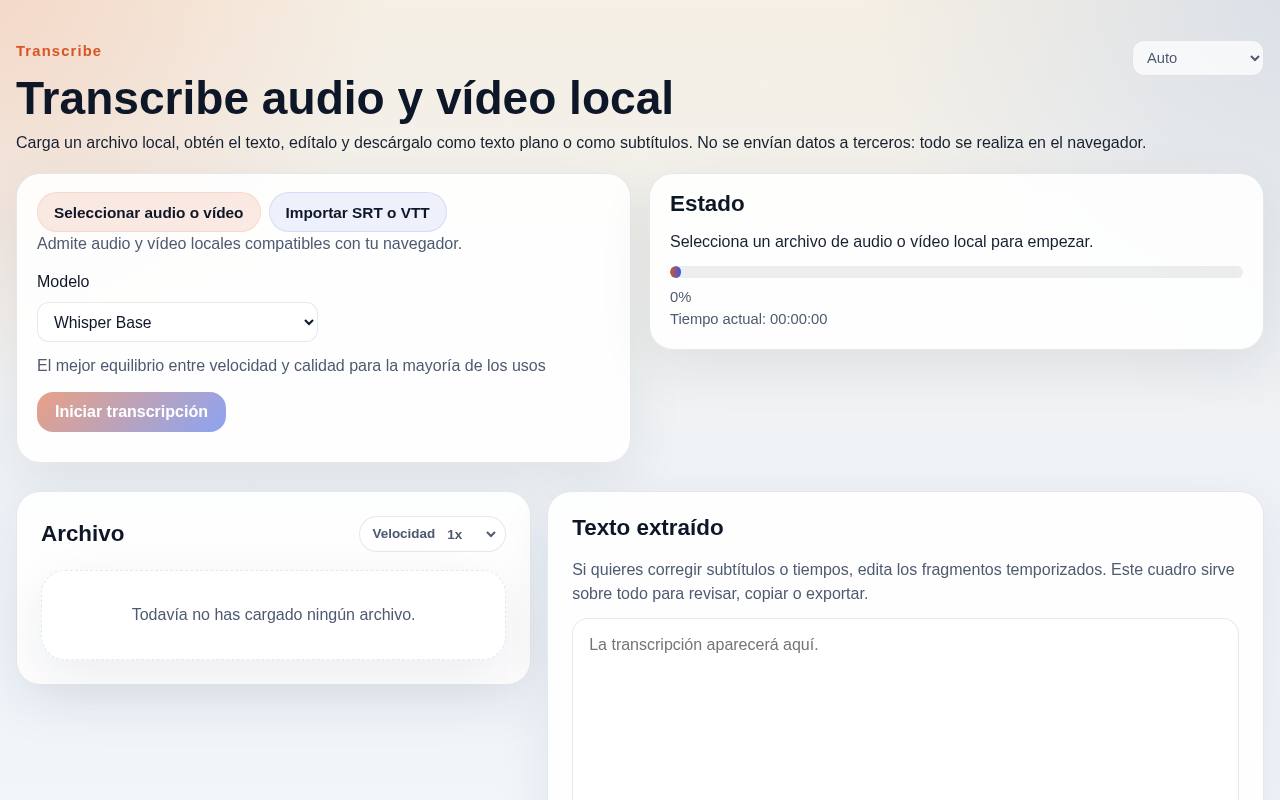
Using it is straightforward. You press “Seleccionar audio o vídeo” (select audio or video), load a local file, choose the model (Whisper Tiny, Base or Small; Base is the default, “the best balance between speed and quality for most uses”, according to the page itself) and press “Iniciar transcripción” (start transcription). According to its author, the model is downloaded the first time, so the first transcription is the slowest. You can also import an SRT or VTT file to correct it.
The most useful part for a teacher is the editor. The text appears in segments with timestamps, which can be read and edited while the audio or video plays, and selecting a segment makes the player jump to that point. The page offers speed control, from 0.75x to 2x, and undo and redo buttons.
It can be used to subtitle your own videos and make them more accessible, to get a transcript of a recorded lesson or an interview, or to let students review a presentation in writing. Because artificial intelligence can get proper names, technical terms or unclear voices wrong, it is best to check the text before using it.
The interface is in Spanish, Catalan, Galician, Basque and English, with a selector in the top corner. According to its author, it keeps ten transcriptions by default, a number that can be changed. The code is licensed under AGPL v3 and, according to the repository entry, the app is aimed at secondary school, Bachillerato (the final two years of secondary school, ages 16 to 18), vocational training, university and adult and teacher education.